

Wireless keyboard with true 8000 Hz - NuPhy WH80
A wireless gaming keyboard that does not require compromises when it comes to speed? Until recently, that sounded suspicious to many gamers. A cable was synonymous with a stable connection and low latency, while wireless models were associated primarily with convenience.
Today, this distinction is starting to lose its meaning.
NuPhy WH80 is an example of how far gaming keyboard technology has come. It offers true 8000 Hz in 2.4 GHz wireless mode, Hall Effect magnetic switches, Rapid Trigger and extensive customization options. All of this is housed in an 80% design that is intended to perform well both during intense gaming sessions and everyday use.
The question remains: does 8000 Hz actually make a difference, or is it just another number that looks better on the box than during gameplay?
What makes NuPhy WH80 stand out?

At first glance, WH80 looks like a refined mechanical keyboard with a fairly classic layout. You will not find an overly futuristic design here trying to convince us that every additional light increases the number of frags.
The most interesting solutions are hidden inside.
NuPhy WH80 combines several technologies that until recently rarely appeared together in wireless gaming keyboards. Above all, it offers 8000 Hz via a 2.4 GHz receiver, which is a polling rate associated with high-end esports equipment.
It is also equipped with Gateron Magnetic Jade Dragon-N magnetic switches, allowing you to adjust the actuation point and use Rapid Trigger. The package is completed by three connection methods, a gasket mount design and NuPhyIO software, enabling customization of individual key behavior.
The key WH80 specifications are as follows:
| Parameter | NuPhy WH80 |
| Layout | ANSI 80%, 83 keys |
| Switches | Gateron Magnetic Jade Dragon-N |
| Technology | Hall Effect |
| 2.4 GHz polling rate | 8000 Hz |
| USB-C polling rate | 8000 Hz |
| Bluetooth polling rate | 125 Hz |
| Gaming features | Rapid Trigger, adjustable actuation, SOCD, DKS |
| Design | Gasket mount |
| Keycaps | PBT |
| Battery | 8000 mAh |
| Claimed battery life | Over 500 hours under appropriate conditions |
| Weight | Approximately 1516 g |
True wireless 8000 Hz - how does it actually work?
This is by far WH80's biggest distinguishing feature. Not because 8000 Hz itself is something unprecedented, but because the keyboard can also use it through a 2.4 GHz wireless connection.
What does an 8000 Hz polling rate mean?
Polling rate determines how frequently a device can report its status to the computer.
In a standard gaming keyboard operating at 1000 Hz, the interval between consecutive reports is 1 millisecond. At 8000 Hz, it is reduced to just 0.125 ms.
Theoretically, this means more frequent transmission of key status information and less waiting time for the next report.
However, it is worth clarifying one thing: polling rate is not the same as input latency.
Total latency also depends on how a key press is detected, the keyboard electronics, signal processing, wireless transmission and computer performance. The fact that a device operates at 8000 Hz does not automatically mean that every key press will be registered in 0.125 ms.
Does NuPhy WH80 really achieve 8000 Hz wirelessly?
In the case of WH80, we do not have to rely solely on the manufacturer's claims.
Independent service RTINGS tested the keyboard and confirmed that it achieves an effective 8000 Hz polling rate. Crucially, the wireless connection also allows its capabilities to be used without significant performance limitations caused by other sources of latency.
Testers also rated single-key and multi-key press latency as exceptionally low. This is more important than the Hz number itself, as it shows that real performance stands behind the specifications.
WH80 is therefore not just a keyboard with “8K” printed on the box. It is hardware whose capabilities are confirmed by independent measurements.
Does 8000 Hz provide a real advantage in games?

This is where it gets interesting.
The difference between 125 Hz and 1000 Hz is much greater than between 1000 Hz and 8000 Hz. At 1000 Hz, the interval between reports is already short enough that further improvements deliver increasingly smaller benefits.
Moving from 1000 Hz to 8000 Hz reduces the maximum interval between consecutive reports by 0.875 ms. This is a genuine technical improvement, but it does not mean that every gamer will be able to consciously feel it.
In dynamic FPS games such as Counter-Strike 2 or Valorant, registering movement as quickly and consistently as possible matters. However, performance is also affected by computer and monitor latency, frame rate, network connection and, of course, player skill.
Therefore, 8000 Hz should not be treated as a magical way to improve accuracy.
With WH80, something else is more important: you can use a very high polling rate without having to connect a cable.
Three connection modes - when should you use 8K?
NuPhy WH80 allows you to use three communication methods. Each has a slightly different purpose.
2.4 GHz connection - for gaming
This is the most interesting WH80 mode. Using the included USB receiver, the keyboard can operate wirelessly at up to 8000 Hz. If maximum performance matters to you but you do not want a cable on your desk, this mode is the best choice.
USB-C - stable wired connection
WH80 also supports 8000 Hz when wired. This is a convenient option when you do not want to worry about battery level or simply prefer a classic connection.
Bluetooth - for everyday use
Bluetooth 5.0 operates at 125 Hz. It is therefore not a mode intended to use the keyboard's full performance. However, it works well for regular work, typing and using multiple devices. WH80 allows pairing with up to three Bluetooth devices.
Also remember that simply connecting the receiver does not necessarily mean that 8K mode is active. WH80 allows switching between 1K and 8K. Before starting a game, it is worth checking the current receiver and keyboard settings according to the manufacturer's instructions.
Hall Effect and Rapid Trigger - WH80 is not just about 8000 Hz
A high polling rate determines how often data is reported, but how quickly the keyboard itself detects key movement is equally important.
This is where magnetic switches come into play.
Gateron Magnetic Jade Dragon-N - how do they differ from regular switches?
NuPhy WH80 uses Gateron Magnetic Jade Dragon-N switches operating with Hall Effect technology.
In classic mechanical switches, a press is registered by physically closing electrical contacts. Magnetic switches, on the other hand, use magnetic field sensors that can determine the position of the moving stem.
This enables actuation point adjustment through software.
You do not have to be limited to one factory-set switch actuation point. You can tailor it to your own preferences.
For example, a shallow actuation point works well for very fast movements in games, while a deeper one can reduce accidental presses while typing.
If you want to learn more about the differences between these two technologies, read our guide: Magnetic switches vs mechanical switches.


Rapid Trigger - faster key reset
Rapid Trigger is one of the most important features of modern magnetic keyboards.
In traditional solutions, a key has specific actuation and reset points. This means that after being pressed, it must return to the appropriate position before another press can be registered.
Rapid Trigger changes how this mechanism works.
Instead of relying solely on a fixed reset point, the keyboard can respond to a change in the direction of key movement. When you begin releasing a key, the system can register the end of the press faster, allowing you to perform the next action sooner.
In practice, this is particularly useful for rapid changes in movement direction and repeated activation of the same keys.
NuPhy claims Rapid Trigger adjustment precision of 0.005 mm. However, this value should be treated as a manufacturer-declared specification, not a guarantee that every actual movement of 0.005 mm will be detected flawlessly under all conditions.
The greatest advantage of Rapid Trigger is therefore not an impressive number of decimal places, but the ability to tailor keyboard responsiveness to your playstyle.
NuPhyIO - customize the keyboard for yourself
An advanced magnetic keyboard needs equally extensive software. In the case of WH80, this is handled by NuPhyIO.
Among other things, it allows you to change the actuation point of individual keys, configure Rapid Trigger, assign functions and macros, manage lighting and use additional gaming solutions.
One of them is Dynamic Keystroke (DKS), which allows different stages of pressing or releasing a key to trigger specific actions.
SOCD-related functions are also available, determining how simultaneous opposing directional signals are resolved. Depending on the configuration, they can affect keyboard behavior during rapid direction changes.
However, it is worth remembering that not all advanced features are allowed in every game. Before using them in ranked or tournament play, check the current rules applicable to the title in question.
RTINGS positively reviewed WH80's software, highlighting its intuitive design and broad range of settings.

How does NuPhy WH80 perform in everyday use?
Gaming specifications are one thing, but a good keyboard should also provide comfort when you are not playing.
Fortunately, WH80 is not a design where all attention has been devoted to minimizing latency.
80% layout - a compromise between convenience and size

WH80 uses an ANSI 80% layout with 83 keys. It retains the function row, arrow keys and selected navigation keys while omitting the numpad.
This solution is similar to TKL, although the layout of individual keys is more compact than in many classic tenkeyless designs.
For gamers, this means more room for a mouse, especially when using low sensitivity. At the same time, you do not have to give up dedicated arrow and function keys, which are useful beyond gaming.
If you do not know whether the 80% format will be right for you, check out our guide to mechanical keyboard sizes.
Gasket mount and acoustics
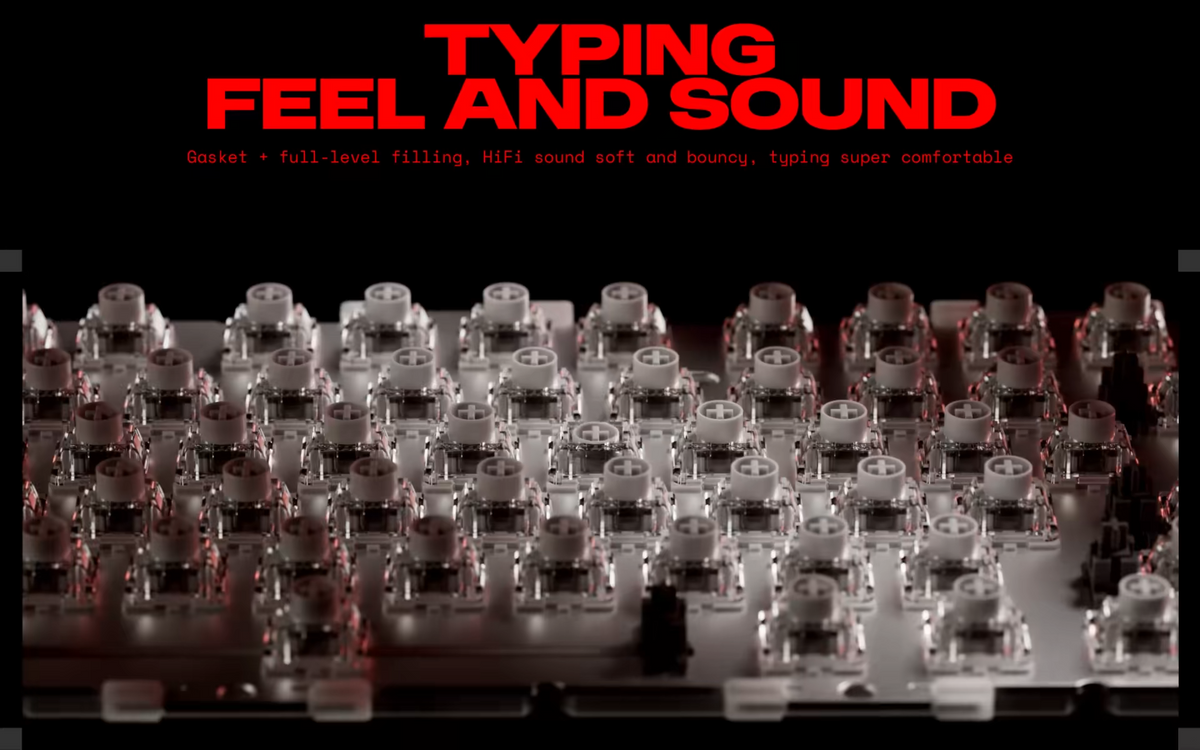
WH80 uses a gasket mount design and several layers of sound-dampening materials.
Gasket mount involves the use of flexible elements between the mounting plate assembly and the case. The purpose of this solution is to change the keyboard's feel and reduce unwanted vibrations.
This does not automatically mean a very soft typing experience. In the case of WH80, the design remains relatively rigid, but offers some degree of cushioning.
According to RTINGS tests, the factory-lubed switches and stabilizers operate smoothly, while the damping materials provide a pleasant, well-controlled sound profile.
This is good news for people who do not want to choose between a gaming keyboard and a pleasant everyday typing experience.
However, it is worth noting the height of the design. WH80 has a high profile, so a wrist rest may prove useful during long working sessions.
8000 mAh battery and over 500 hours of use - where is the catch?
A wireless keyboard with 8000 Hz sounds great, but an obvious question arises: what about the battery?
NuPhy WH80 is equipped with an 8000 mAh battery. The manufacturer claims over 500 hours of wireless use. This is an impressive result, especially for hardware designed with high performance in mind.
However, you should not assume that the keyboard will achieve this battery life while simultaneously using 8000 Hz, maximum RGB brightness and all features in the highest-performance mode.
Actual battery life is affected by factors including the selected connection mode, polling rate, lighting and usage patterns.
In practice, the claimed 500 hours should be regarded as a value achievable under certain conditions, rather than a guaranteed result for every setting.
If maximum performance matters to you, use 8K. If you spend the day typing documents, however, there is little point in maintaining the highest polling rate at all costs.
And this is exactly where WH80's advantage appears: you can adapt how the device operates to your current needs.
Who is NuPhy WH80 a good choice for?
WH80 has plenty to offer, but not every user needs all of its capabilities.
For FPS gamers, low latency, Rapid Trigger and the ability to precisely set key actuation will be most important. This is where magnetic features have the most practical application.
For Hall Effect technology enthusiasts, WH80 will be an interesting combination of advanced features, a high polling rate and wireless freedom. Customization options allow you to experiment with settings without having to replace switches.
For people who work and play at one setup, the three connection modes, convenient layout and refined acoustics will be major benefits. The ability to switch between Bluetooth devices further increases the keyboard's versatility.
On the other hand, WH80 will not be the most rational purchase for someone who uses a keyboard exclusively for browsing the internet and writing messages. In that case, the high polling rate and extensive gaming features will remain largely unused.
It is also worth remembering that the design weighs over 1.5 kg. This is solid hardware for placing on a desk, not a lightweight keyboard for carrying in a backpack every day.
NuPhy WH80 - is it worth it?

NuPhy WH80's greatest advantage is not a single specification. It is the fact that the manufacturer has managed to combine several technologies that genuinely matter to demanding gamers.
Wireless 8000 Hz, very low latency, magnetic switches and Rapid Trigger create a package capable of competing with high-performance wired designs.
Additionally, WH80 offers a pleasant typing feel, solid build quality and extensive software. It is therefore not hardware intended exclusively for breaking records in latency tests.
Will everyone feel the difference between 1000 and 8000 Hz? Definitely not. For many gamers, it will be too small to have a noticeable impact on results.
But if you are looking for a wireless magnetic keyboard that does not force you to give up high performance, WH80 is one of the models definitely worth considering.
FAQ - frequently asked questions about NuPhy WH80
Does NuPhy WH80 support 8000 Hz via Bluetooth?
No. In Bluetooth mode, the polling rate is 125 Hz. To use 8000 Hz wirelessly, connect the keyboard through the included 2.4 GHz receiver and activate the appropriate mode.
Do you need a special receiver to use 8000 Hz?
Yes, in wireless mode WH80 uses the dedicated 2.4 GHz receiver included in the package. A Bluetooth connection alone does not provide 8000 Hz.
How does Rapid Trigger differ from polling rate?
Polling rate determines how frequently keyboard status is reported to the computer. Rapid Trigger determines how key actuation and reset are detected based on their movement. These are two different technologies that affect device responsiveness.
Is NuPhy WH80 suitable for typing?
Yes. Despite its gaming character, WH80 offers an 80% layout, factory-lubed switches, stabilizers and sound-dampening layers. This makes it a convenient keyboard for everyday work as well. However, it is worth remembering its high profile.

Share:
Rapid Trigger in Practice: Why Differences Between Keyboards Are Minimal Today